
Gemma 4 System Requirements: What You Need to Run It on PC, Mac, and Cloud
Exact VRAM and RAM requirements to run Gemma 4 E2B, E4B, 26B MoE, and 31B locally on Windows, Mac, or in the cloud — plus a step-by-step guide with Ollama.
Gemma 4 is Google's most capable open model — and if you've been wondering whether your current machine can actually run it, this guide has the exact numbers you need.
Google released four versions of Gemma 4 in 2026, ranging from a small 2-billion-active-parameter model to a 31-billion-parameter dense variant. The gap in hardware requirements between them is massive, so picking the wrong one for your machine either leaves performance on the table or crashes your system.
Here's a complete breakdown by model, hardware type, and what you need to get started.
The Gemma 4 Model Lineup
Gemma 4 comes in four variants:
| Model | Architecture | Active Params | Best For |
|---|---|---|---|
| E2B | MoE | 2B | Low-end hardware, quick inference |
| E4B | MoE | 4B | Balanced — best for most users |
| 26B A4B | MoE (4B active) | 4B | High quality, efficient at runtime |
| 31B Dense | Dense transformer | 31B | Maximum quality, high VRAM needed |
The E2B and E4B labels mean "Effective 2B" and "Effective 4B" — these are Mixture-of-Experts models that only activate a fraction of their parameters per token, which is why they can run on far less hardware than their total size implies.
PC Requirements (NVIDIA / AMD GPU)
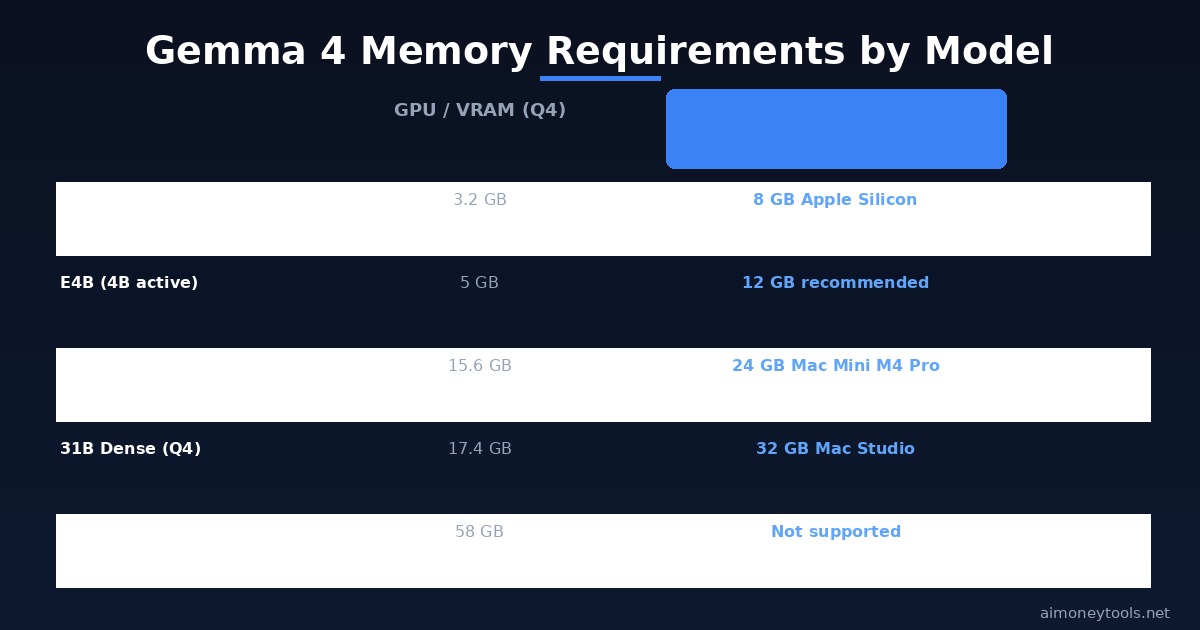
All VRAM figures below assume 4-bit quantization (Q4), which is the standard for running large models locally. Running in full BF16 precision roughly triples the VRAM requirement.
Gemma 4 E2B:
- Minimum VRAM: 3.2 GB (Q4) / 9.6 GB (BF16)
- Compatible cards: GTX 1060 6GB, GTX 1070, RTX 2060, RX 6600
- This model runs comfortably on mid-range cards from 2017 onwards
Gemma 4 E4B:
- Minimum VRAM: 5 GB (Q4) / 15 GB (BF16)
- Compatible cards: RTX 2060 Super, RTX 3060 12GB, RTX 4060
- Best model for most PC users — punches above its weight thanks to MoE architecture
Gemma 4 26B MoE (A4B):
- Minimum VRAM: 15.6 GB (Q4) / 48 GB (BF16)
- Compatible cards: RTX 3090, RTX 4080, RTX 4090 (24GB VRAM)
- Only 4B parameters activate per forward pass — inference is fast despite the large total size
Gemma 4 31B Dense:
- Minimum VRAM: 17.4 GB (Q4) / 58.3 GB (BF16)
- Compatible cards: RTX 3090 or 4090 at minimum (Q4 only)
- BF16 requires a multi-GPU setup (like 3× A100 80GB) — not realistic for home use
- If you're regularly running 31B, cloud inference via Ampere.sh is often more cost-effective than buying a $1,600 GPU
RAM (System Memory):
- For E2B / E4B: 16 GB RAM (8 GB minimum, but expect slowdowns)
- For 26B / 31B: 32 GB RAM recommended
- Fast storage (SSD NVMe) is important — models load from disk on startup
Mac Requirements (Apple Silicon)
Mac users have an advantage: Apple Silicon's unified memory architecture allows the CPU and GPU to share the same memory pool, which significantly lowers the effective hardware threshold compared to discrete GPU setups.
MacBook Air M1/M2 (8 GB):
- Can run E2B at Q4 — tight, expect slower token speeds
- E4B technically loads but will throttle; not recommended
MacBook Air M2 (16 GB) / MacBook Pro M3 (18 GB):
- Comfortably runs E2B and E4B
- E4B at Q4 is a good fit — solid output quality with reasonable speed
- This is the sweet spot for most Mac users
MacBook Pro M3 Max / Mac Mini M4 Pro (24 GB):
- Runs E4B comfortably, plus the 26B MoE at Q4
- The 26B MoE at Q4 requires ~15.6 GB — fits within 24 GB with room for the OS
Mac Studio / Mac Pro (32 GB+):
- Runs all models including 31B Dense at Q4 (needs ~17.4 GB)
- At 64 GB unified memory, even some BF16 configurations are possible
- This is the recommended setup for running 31B with fast token speed
Running Gemma 4: Step-by-Step with Ollama
The easiest way to run Gemma 4 locally is with Ollama — it handles downloading the model, quantization, and serving automatically.
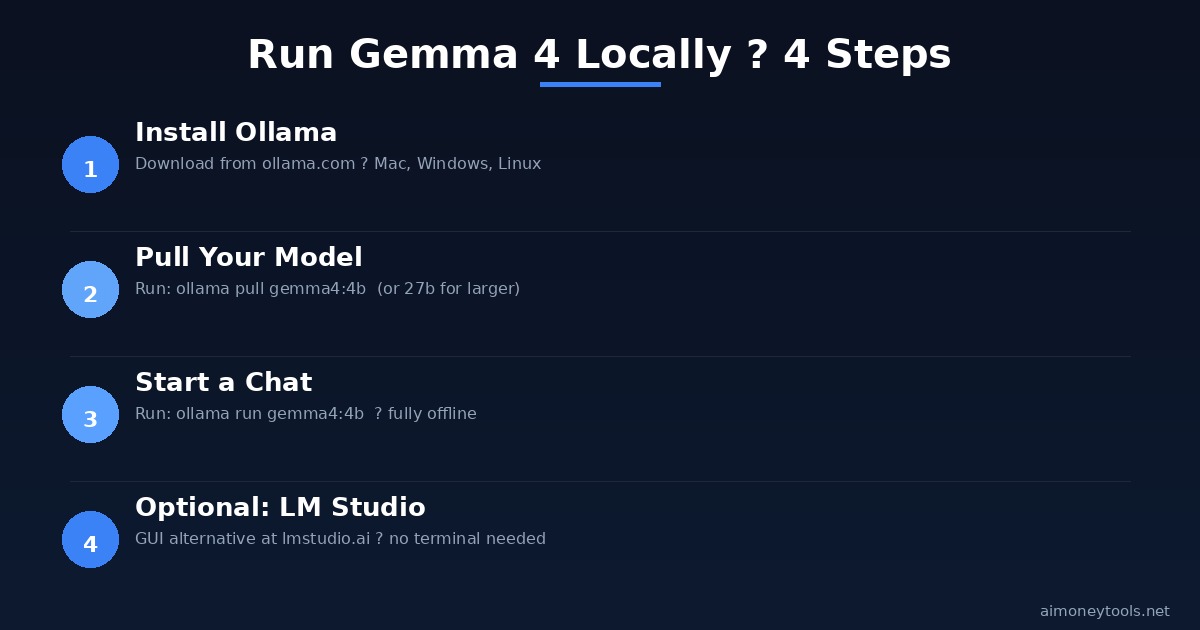
Step 1 — Install Ollama Download from ollama.com. Available for macOS, Windows, and Linux. The installer takes about 2 minutes.
Step 2 — Pull the model
ollama pull gemma4:4b
Replace 4b with 2b, 27b, or latest depending on your hardware. Ollama automatically downloads the appropriate quantized version.
Step 3 — Start chatting
ollama run gemma4:4b
You're now running Gemma 4 fully offline. No API keys, no usage limits, no data leaving your machine.
Alternative: LM Studio If you'd prefer a graphical interface without the terminal, LM Studio is a solid choice. You can search for Gemma 4 models inside the app and run them with a chat UI. Works on both Mac and Windows — useful if our terminal guide is still on your to-do list.
When Local Isn't Enough: Cloud GPU Options
If you're working with the 31B model at full precision, or if you want to run inference on demand without keeping your machine powered on, cloud GPU rental is worth considering.
Ampere.sh is a budget-friendly GPU cloud built for AI workloads — you can spin up an A10G or A100 instance, run your model for a few hours, and shut it down when done. Pricing is significantly lower than AWS or Google Cloud for comparable specs.
For most people experimenting with Gemma 4, E4B locally is more than enough. But for production workloads or research with the 31B Dense, cloud inference is the pragmatic path.
Key Takeaways
- E2B runs on almost any GPU with 4+ GB VRAM or an 8 GB Mac
- E4B is the best pick for most users — 5 GB VRAM or 16 GB Mac is sufficient
- 26B MoE needs 16 GB VRAM or 24 GB unified memory (Mac Mini M4 Pro)
- 31B Dense needs a 24 GB GPU (RTX 4090) or 32 GB+ Mac Studio for practical use
- For larger models or full-precision work, cloud GPU via Ampere.sh beats buying hardware
- Ollama remains the fastest path to local Gemma 4 — pull a model, run it in one command
FAQ
What is the minimum GPU to run Gemma 4? A GPU with at least 4 GB VRAM can run Gemma 4 E2B at 4-bit quantization. The GTX 1060 6GB or newer is enough. For E4B, aim for 8 GB VRAM minimum (though 12 GB is more comfortable).
Can I run Gemma 4 on a MacBook Air? Yes. A MacBook Air M2 with 16 GB unified memory runs E4B (5 GB Q4) without issue. An 8 GB M1/M2 Air can run E2B but will be slower. For 26B MoE, you need at least 24 GB unified memory.
Do I need an internet connection to run Gemma 4? Only to download the model initially. Once pulled, Ollama runs completely offline — no API calls, no cloud dependency.
What's the difference between E4B and 31B? E4B is a Mixture-of-Experts model with 4 billion active parameters — fast, efficient, good quality. 31B Dense is a traditional transformer with all 31B parameters active every pass — much higher quality but requires far more memory and compute.
Can I run Gemma 4 on a gaming laptop? Yes, if it has a discrete GPU. An RTX 3060 laptop (6 GB VRAM) can run E2B. The RTX 4060 Laptop (8 GB) handles E4B. For 26B MoE, you need the RTX 4090 Mobile (16 GB).
What about CPU-only inference? It works but is very slow. E2B on a modern CPU (Ryzen 9 or M-series) is usable for testing — expect 2–5 tokens per second instead of 20–60 on GPU. For real productivity use, a dedicated GPU or Apple Silicon is strongly recommended.
Is Gemma 4 free to run locally? Yes. Gemma 4 is open-weight and free to use locally under Google's Gemma Terms of Use, which allows personal and commercial use. The models are available on Hugging Face and via Ollama at no cost.

Alex the Engineer
•Founder & AI ArchitectSenior software engineer turned AI Agency owner. I build massive, scalable AI workflows and share the exact blueprints, financial models, and code I use to generate automated revenue in 2026.
Related Articles
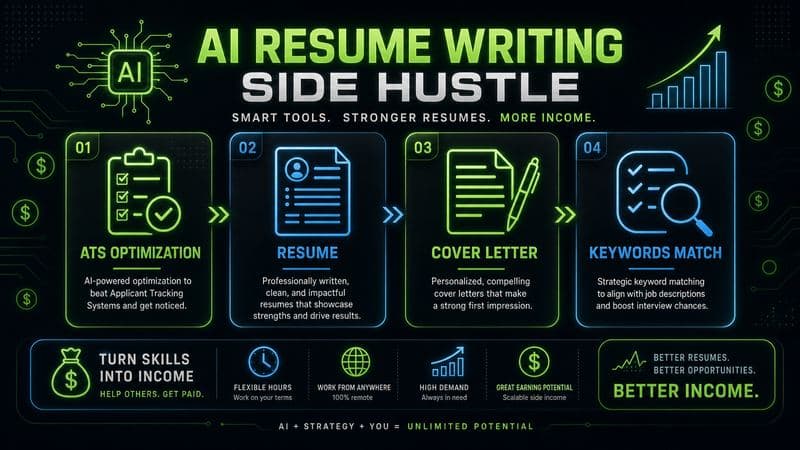
How to Start an AI-Assisted Resume Writing Side Hustle in 2026 (Beginner's Guide)
A step-by-step guide to using AI resume tools to offer a paid resume and cover letter writing service — what to charge, which tools to use, and how to find your first clients.

How to Build and Sell AI Voice Receptionists to Local Businesses in 2026
A beginner's guide to building AI voice agents that answer business phone calls — the tools to use, what to charge, and how to find your first client.

How to Make Money on Fiverr with AI Tools in 2026: 7 Gigs You Can Start This Week
Discover 7 real Fiverr gigs you can launch using free and low-cost AI tools in 2026 — no experience required. Real pricing data, step-by-step setup, and tools that actually work.