
AI YouTube Automation Workflow 2026: Build a Faceless Channel Step by Step
Complete AI YouTube automation workflow for 2026. Build a faceless channel with AI tools — scripting, voiceover, editing, and monetization all covered.
AI YouTube automation allows you to run "faceless" channels by using artificial intelligence to handle scriptwriting, voiceovers, and video editing. These systems have evolved from simple "cash cow" setups into sophisticated digital assets that generate passive income with minimal manual oversight. This guide provides a direct blueprint for building a scalable channel from scratch.
What is Modern YouTube Automation?
YouTube automation is a business model where the channel owner acts as a manager rather than a "creator" in the traditional sense. Instead of filming yourself, you coordinate a workflow—either through AI tools or freelancers—to produce high-quality video content. While the "cash cow" niche started with manual outsourcing on platforms like Fiverr, modern workflows rely heavily on generative models to reduce production costs by up to 80%.
According to HubSpot's 2025 State of Content Marketing report, over 65% of successful digital publishers now integrate AI into their video production pipelines to maintain high output frequencies. The core objective is to build a library of evergreen content that generates AdSense revenue and affiliate commissions 24/7. Success in this field no longer requires a studio; it requires a systematic approach to niche selection and data-driven content production.
How It Differs from Traditional YouTube
If you've spent any time on YouTube, you've probably seen channels with millions of views that never show a single human face. These aren't accidents — they're deliberately engineered content businesses. The difference between old-school YouTube automation and the modern version comes down to quality and sustainability.
Early automation channels in the 2018–2020 era would stitch together public domain images with robotic text-to-speech voices, slap on a keyword-stuffed title, and call it a day. That strategy is essentially dead. YouTube's algorithm has become sophisticated enough to measure audience retention, click-through rate, and "satisfying" watch experiences. If viewers click away after 10 seconds, your video gets buried.
Modern YouTube automation, by contrast, produces content that viewers genuinely want to watch. The scripts are researched, the voiceovers sound natural, and the visuals are edited with pacing in mind. The "automation" part simply means you're using AI tools to do the heavy lifting instead of doing everything manually yourself — or spending thousands outsourcing it to a team of freelancers.
This is what makes 2026 such a compelling time to start. The tools have matured to a point where a solo operator with a $100–$150/month budget can produce content that competes with channels backed by full production teams.
Choosing a High-CPM Niche
Selecting a niche with a high Cost Per Mille (CPM) is the most critical step for maximizing your ROI. In the world of automated channels, your earnings are dictated by the "advertiser friendliness" of your topic. Finance, technology, and business-to-business (B2B) software reviews typically command the highest rates because advertisers are willing to pay more for those audiences.
For instance, a channel focused on "AI SaaS reviews" will often earn 5-10 times more per 1,000 views than a "funny animal" channel. When evaluating a niche, look for topics where viewers have high intent to purchase products or services. Research from Statista indicates that the average CPM for finance-related video content can exceed $30, while entertainment niches often struggle to surpass $2.
Profitable niches include:
- Personal Finance & Investing: High CPMs and strong affiliate potential.
- AI Tool Tutorials: Rapidly growing search volume.
- Health & Biohacking: Evergreen demand with high-ticket supplement affiliations.
- Travel Guides: Excellent for integrating hotel and flight affiliate links.
Niche Comparison: CPM vs. Competition Level
Choosing a niche isn't just about CPM — you also need to weigh how competitive that space is and how easy it is to produce consistent content without burning through ideas. Here's a practical breakdown to help you decide:
| Niche | Avg. CPM Range | Competition Level | Content Sustainability | Affiliate Potential |
|---|---|---|---|---|
| Personal Finance & Investing | $15–$30+ | High | High (evergreen) | Very High |
| AI Tool Tutorials & Reviews | $10–$20 | Medium | High (rapidly evolving) | High |
| Health & Biohacking | $8–$18 | Medium | High (evergreen) | High |
| Business & Entrepreneurship | $12–$25 | Medium-High | High | High |
| Travel Guides | $5–$12 | Medium | Medium (seasonal) | Medium-High |
| History & Education | $4–$10 | Low-Medium | Very High (evergreen) | Low-Medium |
| Entertainment / Viral Clips | $1–$3 | Very High | Low | Low |
The sweet spot for a beginner in 2026 is typically a niche that sits in the medium competition, high CPM quadrant — think AI tool tutorials or business productivity topics. You'll face less competition than in pure finance while still earning meaningful ad revenue on relatively modest view counts.
Who Should Focus on High-CPM Niches?
If you're starting your first automated channel and want to see a return on your monthly tool investment as quickly as possible, a high-CPM niche is the right call. Even at 10,000 monthly views — a very achievable milestone within your first 6 months — a $20 CPM niche earns you $200/month from AdSense alone. That same 10,000 views in a $2 CPM niche earns you just $20.
For beginners who are also building an affiliate income stack, high-intent niches like AI tools and personal finance give you natural opportunities to recommend products inside your scripts without it feeling forced.
The 4-Step AI Production Workflow
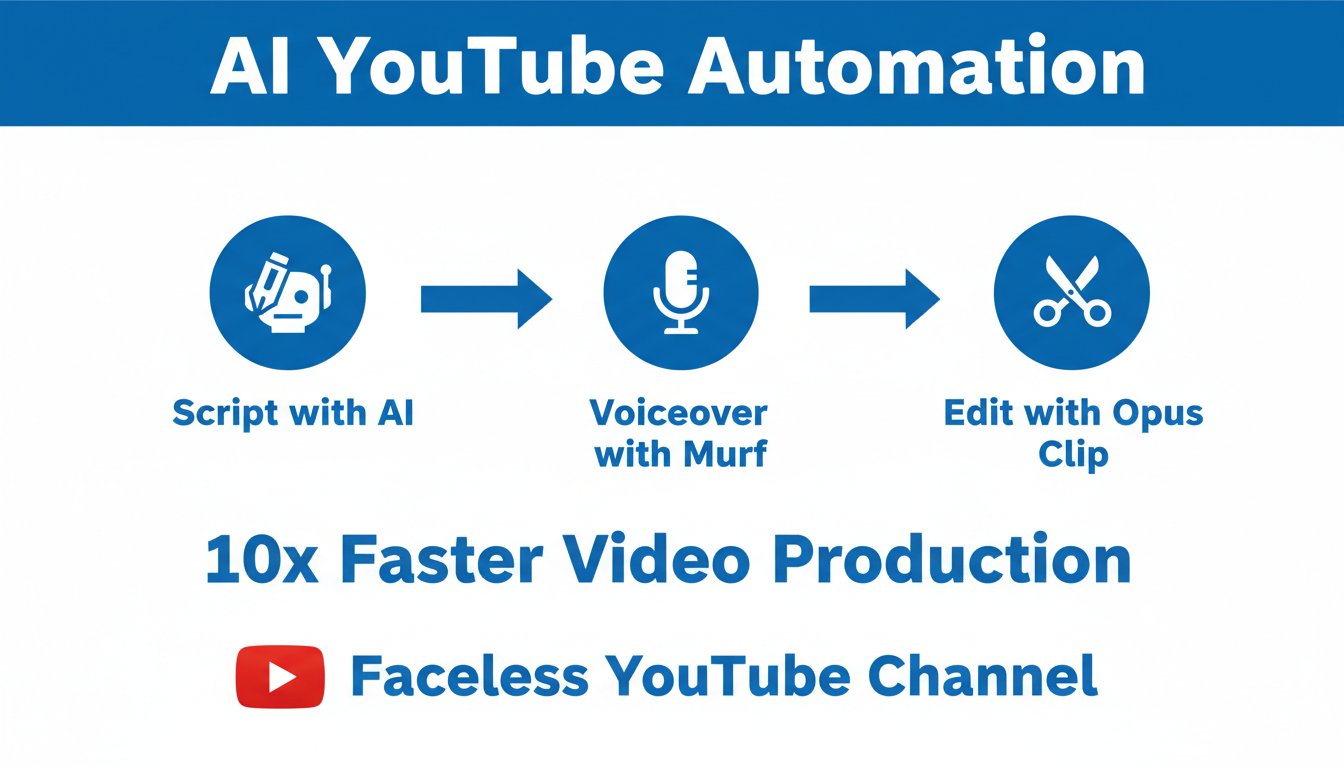
A successful automation workflow turns a video idea into a finished product in under 60 minutes of active work. By using a standardized "assembly line" approach, you can manage multiple channels simultaneously without burning out.
- Ideation and Scripting: Use LLMs like ChatGPT or Claude to generate scripts based on trending keywords found in YouTube's "Research" tab.
- Voiceover Generation: Use Murf.ai to create high-fidelity, human-like narrations. Modern AI voices now include natural breaths and emotional inflection, making them indistinguishable from human voice actors.
- Visual Assembly: Tools like TryHolo.ai or InVideo AI can automatically sync stock footage, captions, and transitions to your audio track.
- SEO Optimization: Use tools like VidIQ to generate click-worthy titles and descriptions based on current algorithm trends.
Step 1: Ideation and Scripting — Going Deeper
The script is the foundation of everything. A weak script means weak retention, no matter how polished your visuals are. When you sit down with ChatGPT or Claude, don't just type "write me a script about personal finance." Instead, feed it a detailed prompt that includes:
- The target keyword you found in YouTube's Research tab or VidIQ
- The intended video length (aim for 8–12 minutes for ad revenue optimization)
- The "hook" style you want (question-based, shocking stat, or story-driven)
- Your channel's brand voice document (more on this in the Advanced Strategies section)
A good AI script prompt might look like: "Write an 1,800-word YouTube script targeting the keyword 'best budgeting apps 2026.' Use a conversational, beginner-friendly tone. Open with a surprising statistic, structure the body as a ranked list of 5 apps, and close with a clear call-to-action to check the affiliate link in the description."
This level of specificity saves you editing time and produces a script that's already structured for viewer retention.
Step 2: Voiceover Generation with Murf.ai
Murf.ai is one of the most popular AI voiceover platforms for YouTube automation, and for good reason. It offers a library of over 120 AI voices across 20+ languages, with the ability to control pitch, speed, and emphasis on individual words.
Pricing: Murf offers a free plan with limited exports. Paid plans start at approximately $19/month for the Basic tier and $26/month for the Pro tier, which includes commercial usage rights — essential for monetized YouTube channels.
Why it matters for automation: The biggest challenge with early AI voiceover tools was that they sounded obviously robotic — flat delivery, no natural pauses, no emphasis variation. Murf's newer voice models include what they call "AI dubbing" quality, with breaths, emotional variation, and conversational cadence built in. For a viewer listening through earbuds, the difference between a Murf voice and a human voice actor is genuinely difficult to detect.
Best For: Channels in professional niches like finance, tech, or business where a polished, authoritative-sounding voice builds credibility with the audience.
Pros:
- Huge voice library with diverse accents and styles
- Commercial licensing included on paid plans
- Easy-to-use editor with per-word control
- Integrates with video tools via audio export
Cons:
- Free plan is limited for production use
- Some voices still sound slightly synthetic on longer scripts
- Pronunciation customization requires some trial and error
Step 3: Visual Assembly with TryHolo and InVideo AI
Once your voiceover is exported, you need visuals. This is where tools like TryHolo and InVideo AI do the heavy lifting. Rather than manually hunting for stock clips and syncing them to your audio timeline, these platforms use AI to match relevant footage to your script automatically.
TryHolo is particularly well-suited for channels that want to create a more engaging "presenter-style" look without ever appearing on camera. It can generate AI avatar presenters that deliver your script on screen, giving your channel a consistent visual identity and a face viewers can associate with your brand — without you needing to be that face.
Best For: Creators who want their channel to feel more personal and brand-consistent than a standard stock-footage channel, but who aren't comfortable (or interested) in appearing on camera themselves.
Pros:
- AI avatar technology gives your channel a "human" anchor
- Automatic B-roll syncing saves hours of editing
- Built-in caption generation
- Good for scaling across multiple channels with different visual identities
Cons:
- AI avatars, while improving rapidly, can look slightly synthetic in close-up shots
- Requires clear, well-structured scripts for best automatic syncing results
Step 4: SEO Optimization — The Distribution Layer
Creating a great video means nothing if no one can find it. VidIQ and TubeBuddy are the two dominant tools for YouTube SEO, and both offer AI-powered features that analyze your title, description, and tags against what's currently ranking.
At minimum, your SEO workflow should include:
- A keyword-rich title that mirrors how people actually search (use YouTube's autocomplete as a guide)
- A description that includes your main keyword in the first two lines
- 5–8 relevant tags
- A custom thumbnail with high-contrast text and a clear visual focal point
Many beginners skip the thumbnail step and use auto-generated images. This is a mistake. Your click-through rate (CTR) is one of the most important signals the algorithm uses to promote your video. Even a simple Canva template with bold text and a relevant image can dramatically outperform a default thumbnail.
Advanced Strategies: Enhancing Human-Like Engagement
To truly stand out, you must bridge the gap between "robotic" automation and human connection. Even without showing your face, your channel needs a brand personality. This is achieved through "Editorial Infusion"—the process of adding unique insights or personal opinions into AI-generated scripts.
Data from Tubular Labs suggests that faceless channels with a consistent "persona" (even if digital) see 40% higher subscriber retention rates than generic stock-footage channels. You can achieve this by training your LLM on a specific "Brand Voice" document so every script feels like it was written by the same expert. Furthermore, using customized B-roll—rather than the same stock clips everyone else uses—creates a visual signature that the YouTube algorithm rewards with higher session duration.
Building a Brand Voice Document
A Brand Voice Document is a simple text file (or even a short paragraph) that you paste into your AI prompting workflow every time you generate a script. It defines your channel's personality so that every video feels like it came from the same "author" — even if you're producing 8 videos per month across two channels.
A basic Brand Voice Document might include:
- Tone: Conversational and encouraging, never condescending
- Audience: Beginners who are curious about AI tools but have no technical background
- Style: Explain concepts with real-world analogies; avoid jargon
- Recurring phrases: Use phrases like "here's the honest truth" and "let me break this down" to create familiarity
- Call-to-action style: Always end with a question to encourage comments
Once you have this document, you can use a tool like CustomGPT.ai to build a dedicated channel assistant that's already trained on your voice, your niche, and your previous scripts. This eliminates the need to re-prompt from scratch every time and ensures your output stays consistent as you scale.
Customizing Your B-Roll Strategy
The fastest way to make your channel look different from the hundreds of other automated channels in your niche is to stop using the same Pexels and Pixabay clips that everyone else is using. A few alternatives:
- Screen recordings: For tech and AI tutorial niches, recording your own screen while navigating a tool is free, original, and highly relevant
- AI-generated imagery: Tools like Midjourney or DALL-E can create custom visuals that no one else has
- Licensed premium stock: Platforms like Storyblocks offer unlimited downloads on a subscription plan, giving you access to a much larger and less-recycled library
Monetization Beyond AdSense
While YouTube AdSense is the most common way to earn, top-tier automation experts treat it as a secondary income stream. Relying solely on ad revenue leaves your business vulnerable to algorithm shifts or demonetization.
The most resilient automated channels integrate affiliate marketing directly into their scripts. By recommending specific software or physical products, you can earn commissions that often dwarf your monthly AdSense check. For example, a single high-ticket software conversion can equal the revenue of 10,000 ad views.
Additionally, consider selling digital products. You can host guides or templates on Gumroad and link them in your video descriptions. This creates a direct-to-consumer revenue model that you control entirely.
Monetization Methods Compared
Not all revenue streams require the same audience size to be effective. Here's how the main options stack up for an automated channel in 2026:
| Monetization Method | Minimum Subscribers Needed | Effort to Set Up | Income Scalability | Vulnerability to Algorithm |
|---|---|---|---|---|
| YouTube AdSense | 1,000 (YPP requirement) | Low | Medium | High |
| Affiliate Marketing | 0 (no minimum) | Medium | High | Low |
| Digital Products (Gumroad) | 0 (no minimum) | Medium-High | Very High | Very Low |
| Channel Memberships | 500 (YPP requirement) | Low | Medium | Medium |
| Sponsored Content | ~5,000–10,000 (typical) | High | High | Low |
The key insight here is that affiliate marketing and digital products can generate income before you even qualify for the YouTube Partner Program. A video with 500 views that drives two affiliate software sign-ups at a $50 commission each has technically made $100 — with zero ad revenue involved.
Building an Affiliate Stack for Your Niche
Your affiliate stack should feel natural to your content, not tacked on. For an AI tools channel, for example, your affiliate stack might include:
- AI writing tools (many offer recurring commissions)
- AI voiceover tools like Murf.ai
- Video production platforms
- Course marketplaces where viewers can go deeper on topics you cover
The rule of thumb is: only recommend tools you'd use yourself (or have actually tested). Audiences are quick to notice when a recommendation feels like a cash grab, and that damages the trust you've spent months building.
Scaling Your Channel Portfolio
Scaling involves moving from one successful channel to a "network" of 3-5 channels in related niches. Once you have a proven workflow for one channel, you can replicate the process using the same AI toolset. This diversification protects your income; if one niche sees a seasonal dip, your other channels can compensate for the loss.
The most successful operators are using AI agents to handle the "boring" parts of management. For example, CustomGPT.ai can be trained on your channel's specific data to handle viewer comments or generate community post ideas, keeping your engagement high without manual effort.
When to Start Your Second Channel
A common mistake beginners make is trying to launch multiple channels at once before any of them gain traction. The better approach is to follow a milestone-based scaling model:
- Channel 1 Milestone: Reach the YouTube Partner Program threshold (1,000 subscribers, 4,000 watch hours) and establish a consistent upload schedule before thinking about Channel 2
- Channel 2 Launch: Choose a related but distinct niche — ideally one that shares some of your existing affiliate relationships so you're not starting from scratch commercially
- Channel 3+: By this stage, you should have a documented production workflow that a virtual assistant (or AI agent) can follow with minimal oversight from you
Using AI Agents for Channel Management
This is where tools like CustomGPT.ai become genuinely powerful. Rather than using a general-purpose chatbot, CustomGPT allows you to build a custom AI assistant that's trained specifically on your channel's content, tone, and audience data. Practical use cases include:
- Drafting replies to common viewer comments
- Generating Community Tab post ideas based on recent video topics
- Repurposing video transcripts into blog posts or email newsletter content
- Brainstorming new video ideas based on your channel's existing topic clusters
This kind of "meta-automation" — using AI to manage the AI-produced content — is what separates hobbyist automation channels from true content businesses.
Key Metrics to Track for Growth
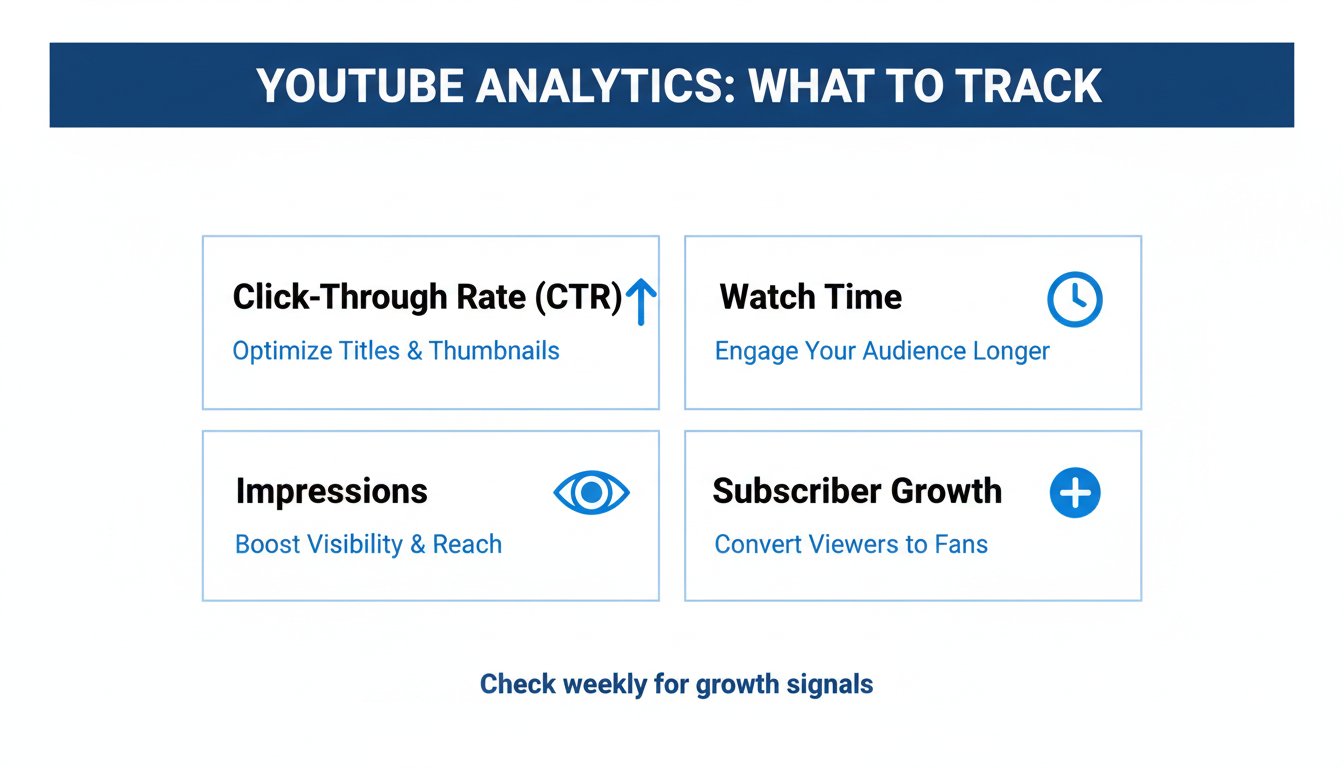
Most beginners obsess over subscriber count. It's the wrong metric to prioritize early on. Here are the numbers that actually tell you whether your channel is healthy:
- Click-Through Rate (CTR): Aim for 4–8% on non-subscribers. Below 3% means your thumbnails or titles need work.
- Average View Duration (AVD): For 10-minute videos, holding viewers for 5–6 minutes (50–60%) is a strong signal to the algorithm.
- Impressions: This tells you how often YouTube is showing your video in feeds — a rising impressions count is a green flag.
- Revenue Per Mille (RPM): Unlike CPM, RPM reflects what you actually earned per 1,000 views after YouTube's cut. Track this to measure your true earnings rate.
Key Takeaways
- Niche Over Views: High CPM niches like Finance and Tech allow you to earn more with fewer views.
- Tool Integration: Use Murf.ai for audio and TryHolo.ai for visuals to maintain a professional standard.
- Diversify Revenue: Do not rely on AdSense alone; integrate affiliate links and digital products from day one.
- Consistent Output: Use AI to maintain a schedule of at least 2 videos per week to stay favored by the algorithm.
Frequently Asked Questions
Is YouTube automation still profitable?
Yes, but the barrier to entry is higher. Low-quality, "spammy" AI content no longer ranks. Success requires focusing on high-value niches and ensuring your AI-generated scripts provide genuine utility or entertainment to the viewer.
Does YouTube monetize AI-generated voices?
YouTube allows monetization for videos with AI voices as long as the content is original and provides value. Using Murf.ai for high-quality narration ensures your content meets the professional standards required for the YouTube Partner Program.
How much does it cost to start?
A basic setup costs between $50 and $150 per month. This typically covers a scriptwriting tool, an AI voiceover subscription, and a video editing platform. This is significantly cheaper than the $1,000+ per month required for manual outsourcing.
Can I get banned for using AI?
No, YouTube has stated that AI is a tool for creators. However, you must disclose if your video contains "altered or synthetic" content that looks realistic (like deepfakes) using their built-in labeling system to remain compliant with YouTube's disclosure policies.
How long does it take to see results?
Most automated channels take 3 to 6 months of consistent uploading (2-3 times per week) to gain traction with the algorithm. Growth is usually exponential rather than linear, with the "tipping point" occurring once a few videos gain search momentum.
Do I need any technical skills to start a YouTube automation channel?
No. The tools covered in this guide — Murf for voiceover, TryHolo for video assembly, and ChatGPT for scripting — are all designed for non-technical users. If you can write a detailed instruction to another person explaining what you want, you have all the "technical skill" required to prompt AI tools effectively. The learning curve is steeper around YouTube SEO and niche research than it is around the actual software.
What's the biggest mistake beginners make with YouTube automation?
Prioritizing quantity over quality. It's tempting to push out as many videos as possible when you have AI doing the heavy lifting, but the YouTube algorithm rewards watch time and viewer satisfaction above upload frequency. Two well-researched, well-scripted 10-minute videos per week will consistently outperform five rushed, thin-content videos. Build your process around quality first, then increase volume once your workflow is tight.
Can I run a YouTube automation channel as a complete side hustle while working full time?
Yes — this is actually the most common way people start. The active work involved in running a single automated channel (keyword research, reviewing AI scripts, uploading and optimizing) typically takes 5–10 hours per week once your workflow is established. The first month will take longer as you learn the tools, but after that, the process becomes highly repeatable and fits comfortably around a full-time schedule.
Is it better to use an AI avatar or stock footage for visuals?
It depends on your niche and brand goals. Stock footage is faster to produce and works well for educational or list-based content where visuals are supplementary. AI avatar tools like TryHolo are better if you want your channel to have a consistent "face" and persona — which tends to drive stronger subscriber loyalty over time. For beginners, stock footage is a lower-friction starting point; avatars are worth exploring once your channel concept is validated.
Get the Blueprint: Want to launch a profitable AI business from scratch? Grab The Ultimate AI Toolkit ($19) — a 200+ page framework featuring exact implementation steps for content automation, consulting, and AI agency building.
Related Articles:

Alex the Engineer
•Founder & AI ArchitectSenior software engineer turned AI Agency owner. I build massive, scalable AI workflows and share the exact blueprints, financial models, and code I use to generate automated revenue in 2026.
Related Articles
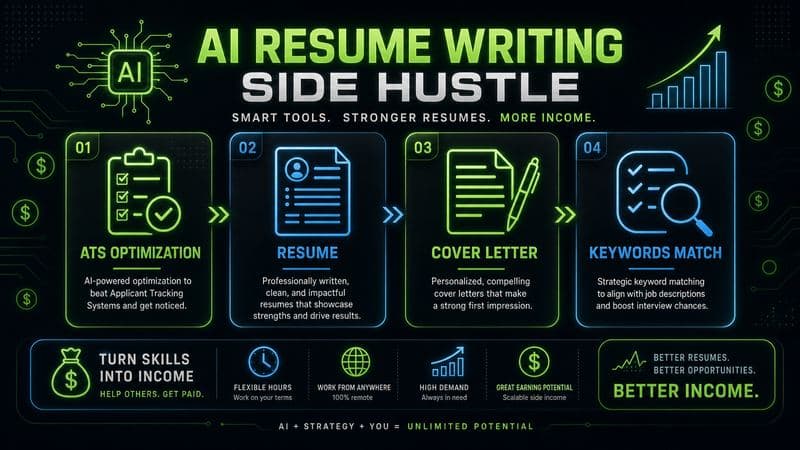
How to Start an AI-Assisted Resume Writing Side Hustle in 2026 (Beginner's Guide)
A step-by-step guide to using AI resume tools to offer a paid resume and cover letter writing service — what to charge, which tools to use, and how to find your first clients.
How to Build and Sell AI Voice Receptionists to Local Businesses in 2026
A beginner's guide to building AI voice agents that answer business phone calls — the tools to use, what to charge, and how to find your first client.
How to Make Money on Fiverr with AI Tools in 2026: 7 Gigs You Can Start This Week
Discover 7 real Fiverr gigs you can launch using free and low-cost AI tools in 2026 — no experience required. Real pricing data, step-by-step setup, and tools that actually work.